Imagine if you could turn any picture that comes to your mind into reality without picking up a camera or doing a photoshoot, just by describing it in words.
Today, AI has made this possible. Now you don’t need an expensive camera or design skills to create images. Just write a few lines, and AI will generate a brand-new image for you. Google’s Gemini AI is a great example of this technology. Many people want to know how to create photos using Gemini AI, but they often don’t find clear and easy information. That’s why in this article, we will understand in very simple language how to create photos using Gemini AI and how an ordinary person can use it.
What is Gemini AI and How Does It Create Photos
Gemini AI is a modern artificial intelligence system developed by Google that can understand text and perform many tasks. It doesn’t just answer questions; it can also generate images. When you tell Gemini AI what kind of photo you want, it understands your words and creates a new image based on them. This image does not already exist anywhere; the AI generates it on its own.
Gemini AI analyzes your written words, emotions, and details to decide how the colors will look, what the background will be like, and how the objects will appear. That’s why the clearer and simpler your description is, the better the image will be.
What You Need to Create Photos with Gemini AI
To create photos using Gemini AI, you don’t need any special technical knowledge. You just need a smartphone or a computer and an internet connection. You also need to log in with your Google account. The good thing is that Gemini AI’s interface is very simple, so even someone using it for the first time can understand it easily.
You should also remember that you don’t need to write in advanced English or complicated language to create images. Explaining your idea in simple words is more than enough.
How to Start Creating Photos on Gemini AI
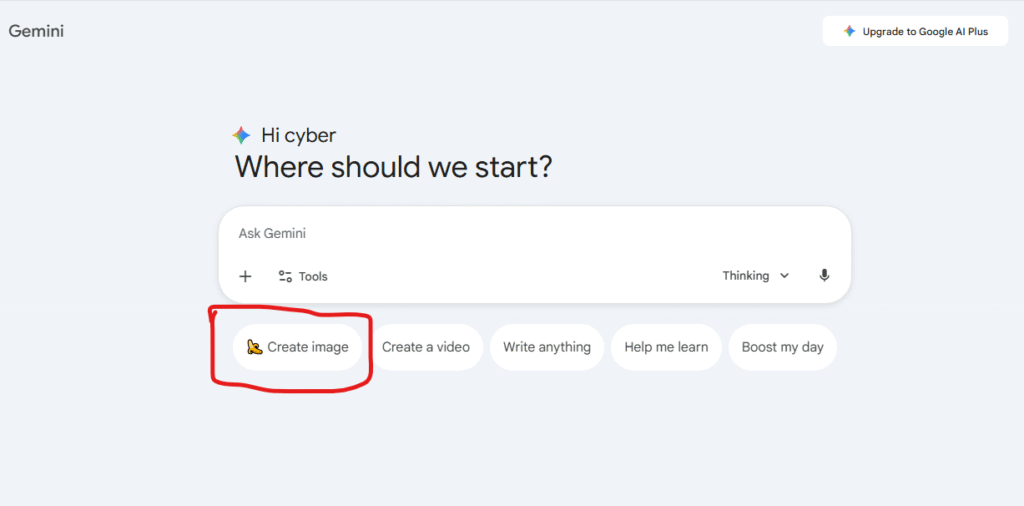
When you open Gemini AI, you will see a chat box, just like messaging someone. In that box, you need to type what kind of photo you want. For example, if you write, A river flowing between mountains with a small house standing beside it, Gemini AI will understand this line and generate an image accordingly.
The first time you create a photo, you might not get exactly what you imagined, but there’s no need to worry. You can give additional instructions to refine or change the image.
Why Writing the Right Description is Important for Good Results
The most important thing when creating images with Gemini AI is your written instruction, commonly called a prompt. If your prompt is clear and detailed, the image will also be better. For example, if you only write a boy, the AI will create an image based on its own understanding. But if you write, a 20-year-old boy wearing a blue shirt, sitting in a park during the evening, the image will be much more accurate.
So, while creating images, mentioning colors, atmosphere, time, and emotions always helps.
Where You Can Use Photos Created by Gemini AI
Photos created using Gemini AI can be used in many places. If you are a blogger, you can use these images in your blog posts. Social media users can use them for Instagram, Facebook, or WhatsApp posts. YouTube creators can use them to design thumbnails.
Students can also use Gemini AI images for presentations and projects. These images help you present your ideas more clearly and effectively.
Are Photos Created by Gemini AI Free
Many people wonder whether they need to pay to create photos using Gemini AI. Currently, the basic use of Gemini AI is free, although advanced features may require payment in the future. So, using it now can be very beneficial.
Even in the free version, you get good-quality images that are perfectly suitable for general use.
Things to Keep in Mind While Creating Photos with Gemini AI
While using Gemini AI, you should make sure not to generate images related to inappropriate or harmful content. According to Google’s guidelines, some types of images are not allowed. You should also avoid creating images that could harm the identity or reputation of real people.
If you use Gemini AI for positive and appropriate purposes, it can be a very powerful and helpful tool.
The Future of Gemini AI Photo Generation
In the coming time, Gemini AI is expected to become even smarter. Image quality will improve further, and users will get more control over image creation. In the future, you might be able to create entire visual stories just by writing text.
Those who start learning and using Gemini AI now will benefit the most from this technology in the future.Conclusion
Creating photos with Gemini AI has become extremely easy today. If you have an idea but no way to visually present it, Gemini AI can help you. Without any design skills and without spending money, you can create impressive images. You just need to know how to express your idea in the right words.
If you want to move forward with technology, try Gemini AI today and watch your imagination turn into images.