Nowadays, a mobile phone is no longer limited to just calls or messages. Watching videos, doing online work, studying, gaming, and earning money everything is done through a mobile. In such a situation, if the internet is slow, it becomes very frustrating. That is probably why this question has come to your mind: how to convert your mobile from 4G to 5G network. If you also want to know this, then this article is for you. Here, I am going to explain the complete process in very simple, everyday English, without any confusion.
What is 5G and why is everyone so crazy about it?
5G means the fifth generation of mobile network technology. Compared to 4G, 5G offers much higher speed. Where videos sometimes buffer on 4G, the same videos play instantly on 5G. Downloading, uploading, online gaming, and live streaming become much smoother. This is the main reason why everyone wants to use 5G today.
Can every mobile run 5G?
This is a very important question. The truth is that not every 4G mobile can be converted into 5G. If your phone does not support 5G, then no matter what you try, 5G will not work. So first, you need to check whether your mobile supports 5G or not.
For this, go to your phone settings and open the About Phone section. If you see 5G mentioned there, only then the next steps will work.
Just having a 5G phone is not enough, the SIM must also be right
The good news is that most new 4G SIM cards already support 5G. Especially if your SIM was taken in the last few years, you usually do not need a separate 5G SIM. In India, major companies like Jio, Airtel, and Vi provide 5G services on existing 4G SIM cards.
However, if your SIM is very old and you face network issues, it is better to visit the nearest store or contact customer care and replace the SIM.
Check whether 5G network is available in your area or not
Many people make the mistake of blaming their phone even when everything else is correct. The reality is that 5G will work only if it is available in your area. Even today, 5G has not fully reached many small towns and rural areas in India.
You can check 5G availability through your network provider’s website or official app.
How to enable 5G from mobile settings
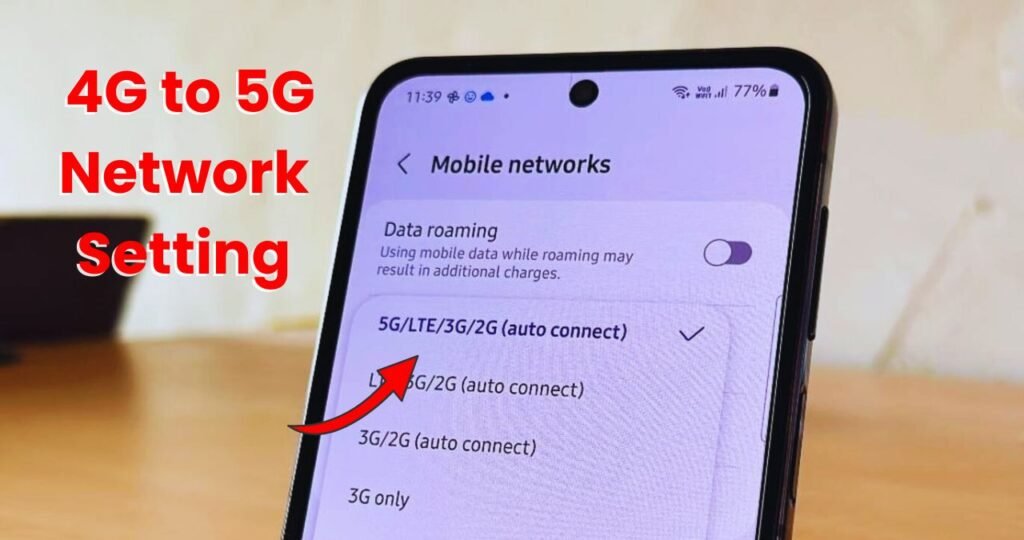
This is the most important step, and this is where most people make mistakes. Many times, even though the phone supports 5G, the network mode is still set to 4G.
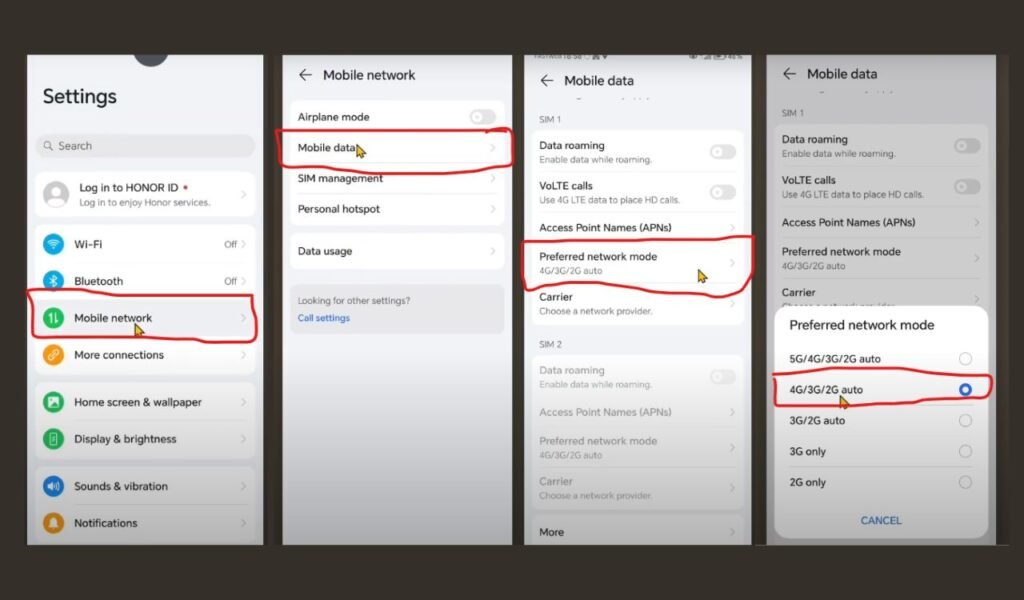
- To turn on 5G in mobile settings, first open the Settings of your mobile phone.
- Now go to the Mobile Network / SIM & Network option.
- Select the SIM that you use for internet.
- After that, tap on Preferred Network Type / Network Mode.
- Here you will see options like 5G, 5G/4G Auto, or NR/LTE/3G/2G (Auto).
- Select this option and save the settings.
- As soon as the settings are saved, the mobile will start searching for a new network.
- If 5G network is available in your area, the network will automatically switch to 5G within a few seconds.
- When 5G appears near the signal icon at the top of your mobile screen, it means the 5G network has been successfully turned on.
How to know if 5G is working or not
When you see 5G written near the network signal icon on the top of your mobile screen, it means your phone is connected to a 5G network. You can also use an internet speed test app to confirm this. 5G speed is usually much higher and clearly feels different from 4G.
Important things to know before using 5G
As fast as 5G is, it also consumes more data. If you have a limited data plan, your data may finish faster. So while using 5G, it is important to keep an eye on your data balance.
Also, 5G can consume battery a little faster, especially if the network keeps switching frequently.
What to do if 5G is not working
If 5G is not working even after everything seems correct, first restart your phone once. Many times, a simple restart fixes the problem.
If the issue still continues, contact your network provider’s customer care or check their app for 5G activation-related information. Some networks require a one-time confirmation through their app to enable 5G services.
Will 4G automatically become 5G in the future?
This is another common question. The truth is that a 4G phone will never automatically become a 5G phone. 5G requires specific hardware support. Yes, network coverage will improve over time and reach more areas, but if your phone is 4G only, it will remain 4G.
If your phone supports 5G, your SIM is compatible, 5G is available in your area, and your mobile settings are correctly configured, then switching from 4G to 5G is not difficult at all. You just need the right information.
I hope after reading this article, all your confusion about converting from 4G to 5G is cleared. If you still have any questions, feel free to ask.