If you have received the Special Intensive Revision (SIR) form for updating your voter details and you are confused about how to fill it, don’t worry. Many people get this form from their BLO, school, or local election team, but they don’t understand what information to write in each box. The same problem might be happening with you too the form is in your hand, but the instructions are not clear.
That is exactly why this entire guide is written based on the photo you provided, so you can fill every part of the SIR form correctly without any mistakes. Let’s understand everything in the easiest way.
What is the SIR form and why is it required?
SIR stands for Special Intensive Revision. It is a special campaign run by the Election Commission to update the voter list. During this period:
– New voters can apply for adding their name
– Wrong details can be corrected
– Missing family members can be added
– Names of dead or shifted persons can be removed
This means the SIR form helps the Election Commission maintain an accurate and updated voter list.
The photo you shared is also the same type of form, where you need to fill in your personal details, address, age, and family voter information.
Documents you need before filling the SIR form
Before you start filling the form, keep these documents ready. These are usually required:
– Aadhaar Card (important for address and ID proof)
– Birth Certificate or 10th Marksheet (for age proof)
– Address Proof like Ration Card, Electricity Bill, Water Bill, Bank Passbook
– Old EPIC Number (if you already have a voter card)
– Passport-size photo (sometimes required)
Keeping these ready will help in faster approval.
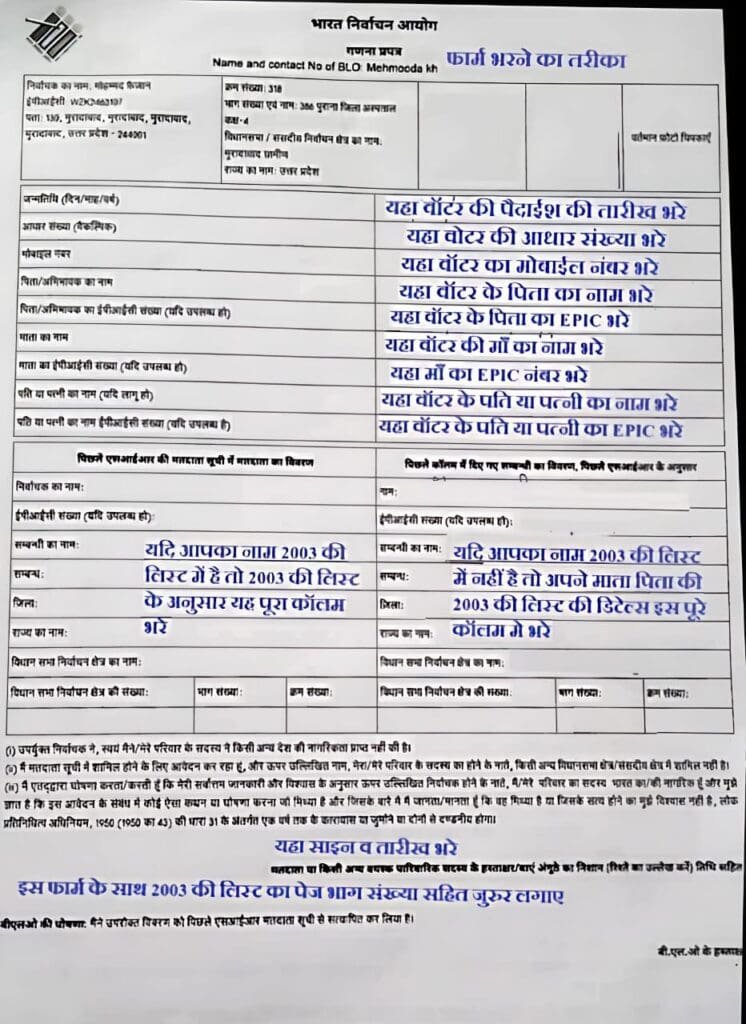
Now let’s fill the SIR form step by step (based on the photo)
Below is a complete explanation of what to write in each section, exactly as the photo shows.
1. Name and Relationship Details
At the top of the form, you will see fields for Name. Here, write your full name clearly in Hindi or English.
Just below that, fill in your Father’s Name, Mother’s Name, or Husband’s Name whichever applies to you.
Make sure your spelling matches the spelling in Aadhaar or any other official document. Wrong spelling may cause verification issues later.
2. Age and Date of Birth
In this section, write your date of birth and age.
If your date of birth is available on your birth certificate or school certificate, write the same date.
If you do not have a document for exact date, you can write an approximate year because in many rural areas, this is acceptable.
Age should be written according to the current year.
For example, if the form is being filled in 2025 and you were born in 2005, then your age will be 20 years.
3. Address Information
Now fill your complete residential address. The form asks for:
– House Number (if not available, write “N/A”)
– Village / Locality
– Post Office
– Tehsil
– District
– Pincode
You should write the same address that appears on your Aadhaar or electricity bill.
If you live on rent, you may write your landlord’s house number too.
4. Family Members’ Voter Details
In the photo, there is a table for entering details of your family members who are already registered as voters.
Here you need to write:
– Name of each family member
– Their EPIC Number (Voter ID number)
– Their age and gender
– Whether their name is already listed in the voter list
This section helps the BLO identify how many voters are already registered from your family and who needs to be added.
5. Booth / Part Number (Polling Area)
The form also has a column for your polling booth number or Part Number.
If you don’t know it, don’t worry your BLO will fill it.
You can also check it from your previous voter card or online if needed.
6. Mobile Number and Contact Information
In the lower section of the form, there is a field to write your mobile number.
You must write your active mobile number because the BLO may call or send an SMS for verification or updates.
Avoid giving someone else’s number.
7. Declaration and Signature
At the end of the form, there is a declaration. This confirms that:
– All the information you have written is correct
– You live at the address mentioned in the form
– You are not registered as a voter in any other location
After reading it, sign the form. Use the same signature that is on your bank or Aadhaar documents for consistency.
Where to submit the SIR form?
Once your form is complete, you can submit it:
– Directly to your BLO
– At the special camps organised in schools or panchayat bhawans
– At the booth-level counters during revision days
In the photo as well, it is written that this form is accepted by BLO and election staff.
Important things to remember while filling the SIR form
– Write all details clearly and neatly
– Don’t leave any section blank
– Attach clear photocopies of required documents
– If you recently changed your address, attach updated proof
– Make sure your name is not registered in two locations
These simple precautions ensure your form will not get rejected.
Conclusion
Filling the Special Intensive Revision (SIR) form is actually very easy when you understand each section properly. The photo you provided includes all the basic details like name, father’s name, age, address, family voter details, and signature. This article explains each part in simple English so that you don’t face any confusion while completing it.
If you follow the steps above carefully, your SIR form will be accepted without any hassle, and your voter information will be updated smoothly.